Changelog

Follow new updates and improvements to AYON.

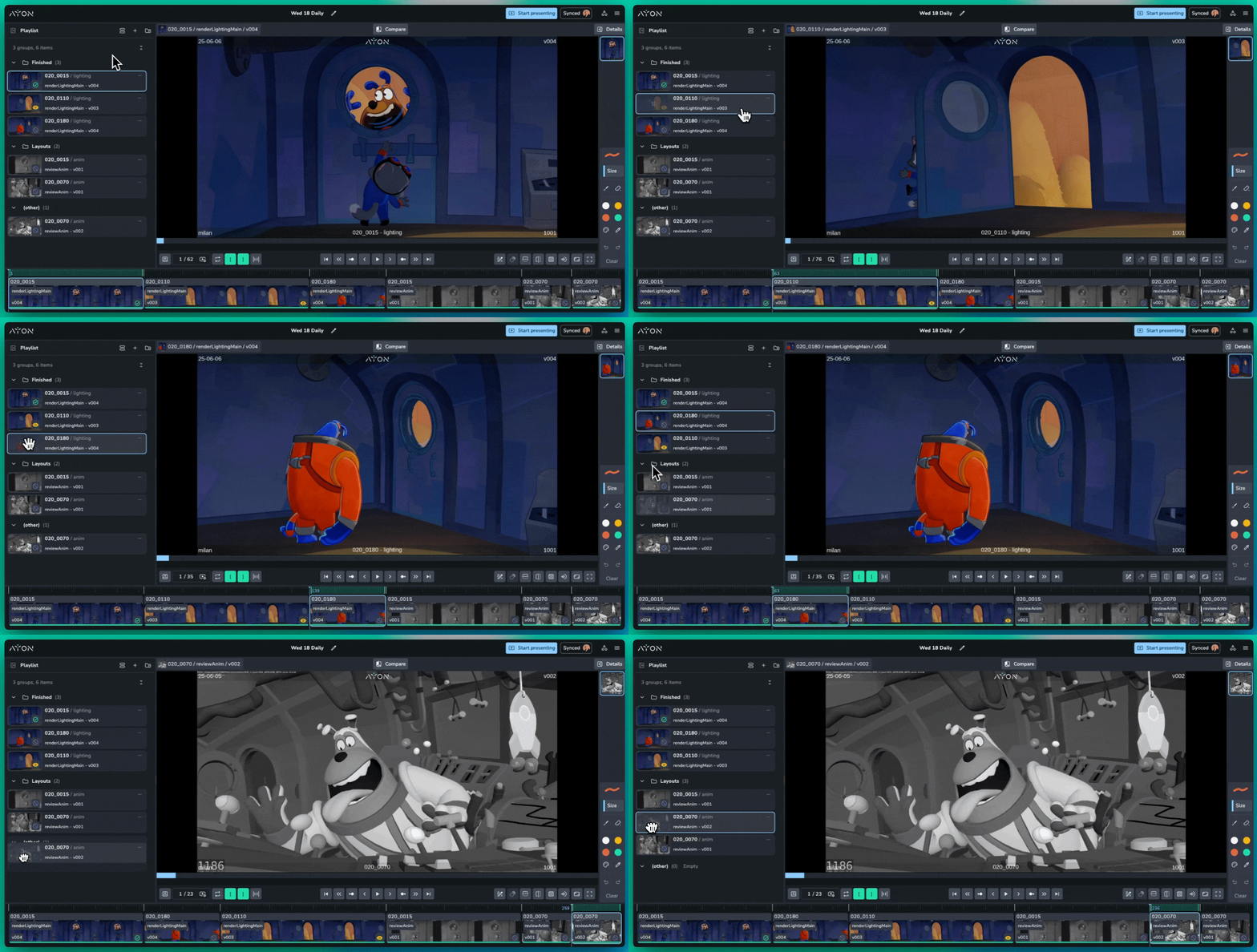
Review 0.3.2 - Stability Release

This update focuses on refining the stability of Review Sessions for smoother collaboration and more reliable playback. We recommend updating now to benefit from these immediate improvements. We are already targeting deeper de-syncing fixes for our next release.


❤️ Improvements

  • Enhanced UI Locking: Allow users to configure the UI view, including going full screen, whilst another user presents.

  • Controlled Session Management: Playlist and playback controls are now disabled for synced participants to prevent session interference.

🛠️ Fixes

  • Reviewables Comparison: Fix an issue that prevent comparison across reviewables of the same version.

  • Reliable Media Loading: Improved caching to ensure the correct file ID is always prioritized.

  • Version Updates: Fixed clips not updating correctly when a version was replaced in the timeline.

  • Data Consistency: Resolved issues where the Details Panel could show outdated metadata.

  • HTTP Compatibility: Fixed a crash occurring when accessing Review via standard HTTP.

  • Comparison Sync: Fixed two issues causing visual desync during version comparisons.

  • Performance: Optimized entity handling for faster and more stable AYON Actions.

  • UI Polish: * Prevented presenter name wrapping.

    • Standardized sync-block styling in the Clip List.

    • Fixed z-index issues with the Sync controls dropdown.

    • Corrected Playlist thumbnail aspect ratios and tiling.

    • Improved frame scaling across different window sizes.

Review is a premium addon included with the Studio subscription, or as an extra with a Pro subscription.
AYON 1.14.4 - Improved Version Uploading

This update brings significant improvements to how you manage entity relationships, upload new work, and interact with data in the table view.

📤 Smarter Version Uploading

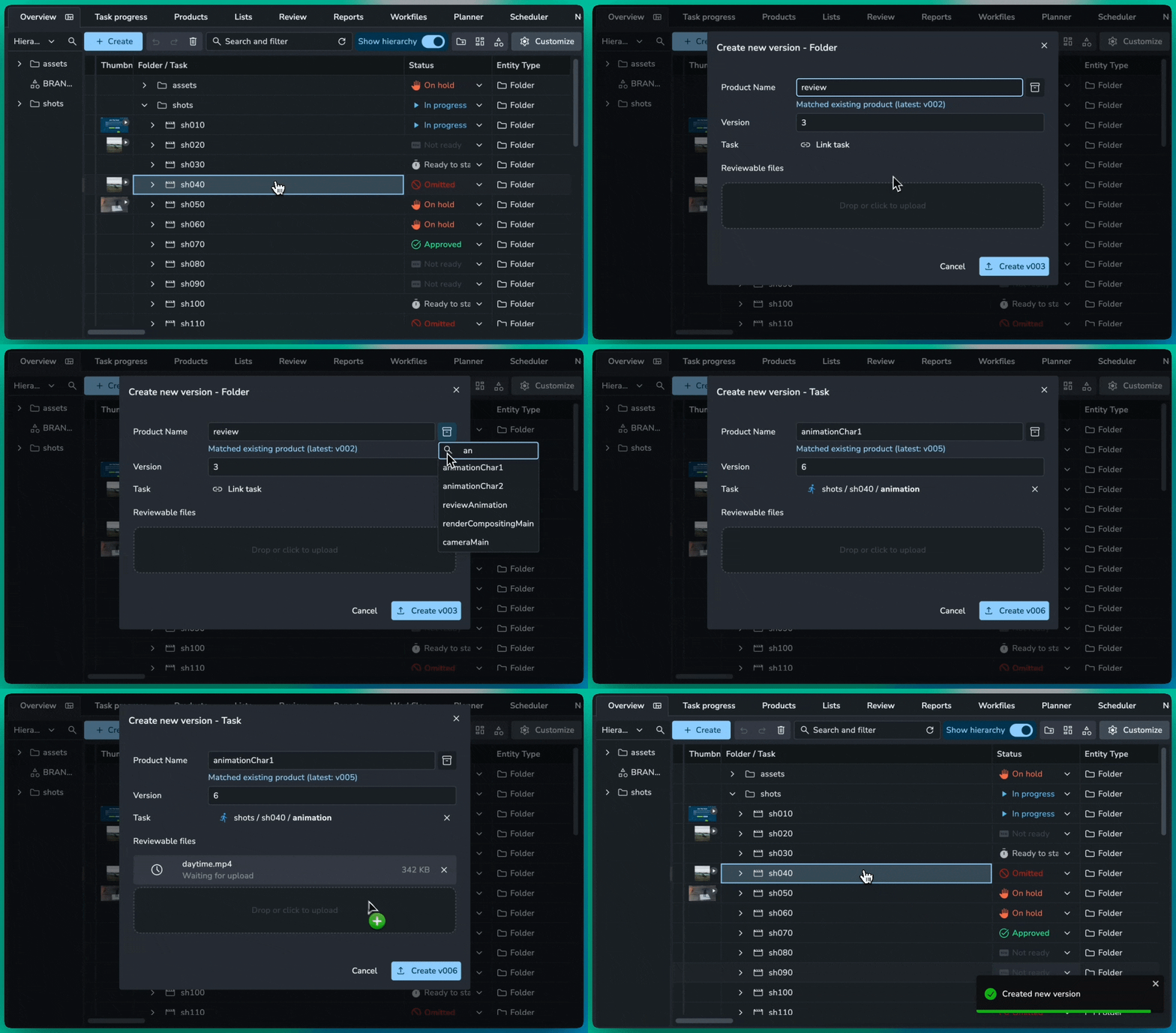
We’ve overhauled the manual version upload process from the Project Overview Page to prevent accidental duplicates and streamline your workflow.

  • Existing Product Matching: When you type a product name, AYON now checks for existing matches in that folder.

  • Auto-Versioning: If a match is found, the system automatically sets your upload to the next available version (e.g., v004 if v003 exists) and syncs the product type for you.

  • Product Picker: A new "inventory" icon next to the name input allows you to browse and select from existing products directly within the upload dialog.

🔗 Multiple Links

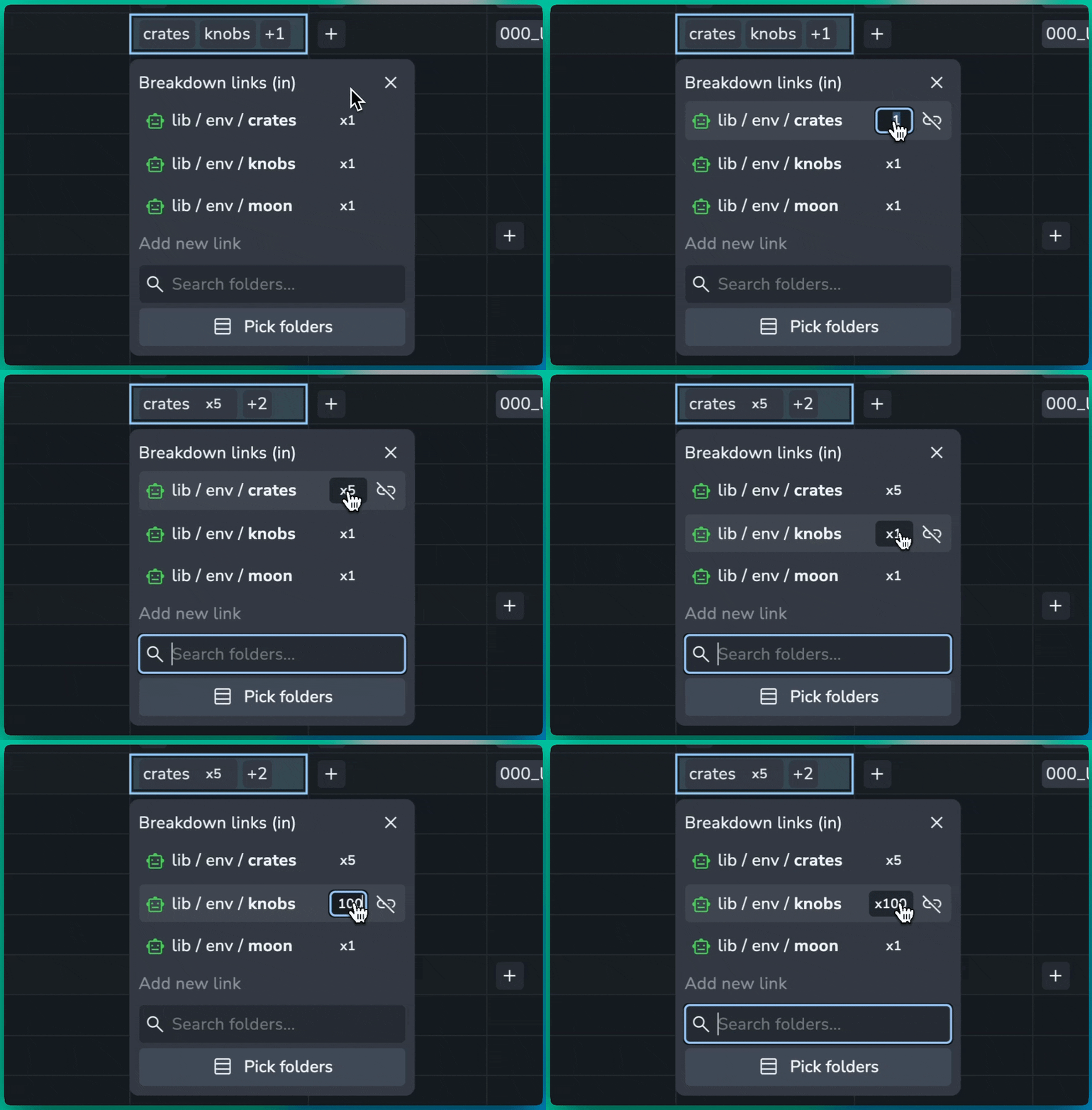
Managing repetitive relationships is now much cleaner with the redesigned Links Manager. Instead of seeing multiple identical entries, duplicate links to the same entity are now automatically grouped.

  • Count Badges: Grouped links now display a clear badge (e.g., x5) in both the Links Manager dialog and table cells.

  • Inline Editing: Need to change the number of links? Click the badge to open an inline input. Increasing or decreasing the number will automatically create or remove links in the background.

✍️ Inline Text Editing

The inline table text editing to make it easier to write longer and more descriptive brief.

❤️ Improvements

  • Products: Add product base type column to Products page #1873

  • Entity Picker: Preserve child selection state when switching parent nodes #1881

  • Description: Improved string fields in the table #1566

🛠️ Fixes

  • Guests: Fix guests not being able to comment in review sessions #889

  • Details: JSON viewer displays incorrect text selection #1870

  • Lists: Fix folder row IDs leaking into list selection lookup #1875

  • Comments: Adding over 6 attachments causes formatting issues #1878

  • Filters: Remove confusing radio button icons for boolean filters #1894

  • Table: Fix sorting column showing on pinned columns #1896

📚 Resources

Note: Ynput cloud hosted instances have automatic, scheduled updates. Self-hosted servers require you to update yourself How to Update Your AYON Server

ServerProduction Tracking

Review 0.3.0 - Enhanced Playlists and Comparisons

Creative reviews just got a lot more powerful and organized. This update focuses on giving you total control over your review sessions with a brand-new Playlist panel, a highly visual grid view, and the ability to compare your work against anything in your project.

📋 Direct Playlist Management

The new Playlist panel replaces the old "Clips View," allowing you to manage your entire session directly within the player.

  • Custom Sections: Create any number of collapsible sections to organize your work. Use them to separate Shots vs. Assets, group by Sequence, or categorize by Priority (e.g., "Final Polish" vs. "Needs Fixes").

  • Dynamic Grouping: Instantly group clips by Status or Task. You can even drag a clip into a different status group to update the version's status in real-time.

  • Live Editing: Add, remove, or replace clips on the fly. Swap versions or pick a completely different product to insert into the session without leaving the interface.

  • Reordering: Simply click and drag thumbnails to change your review sequence instantly.

🖼️ Visual Card View

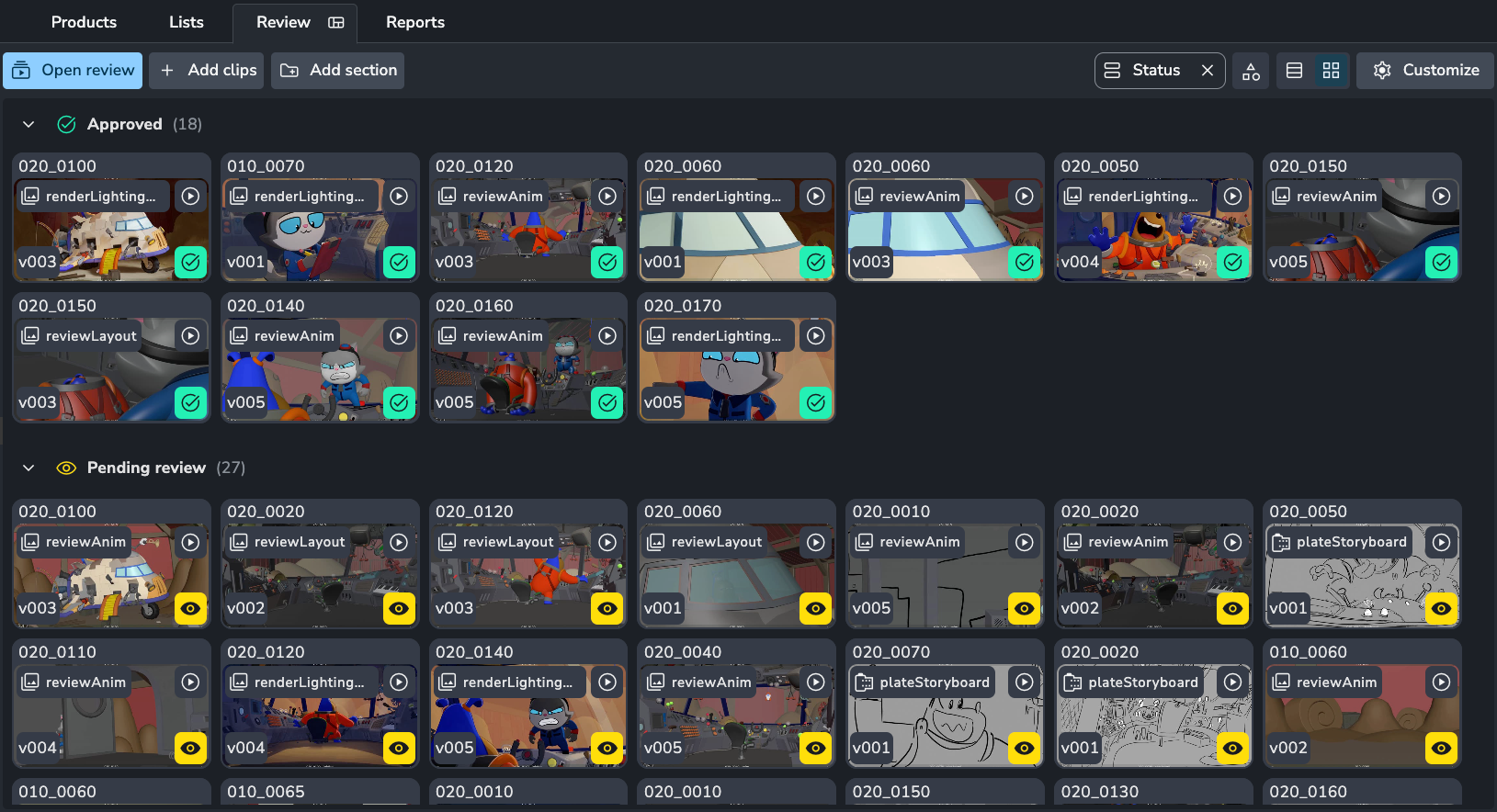
The Review tab on the AYON server has been redesigned for a more visual experience. The new Grid View makes it much easier to browse your review sessions at a glance.

🔍 Compare Anything

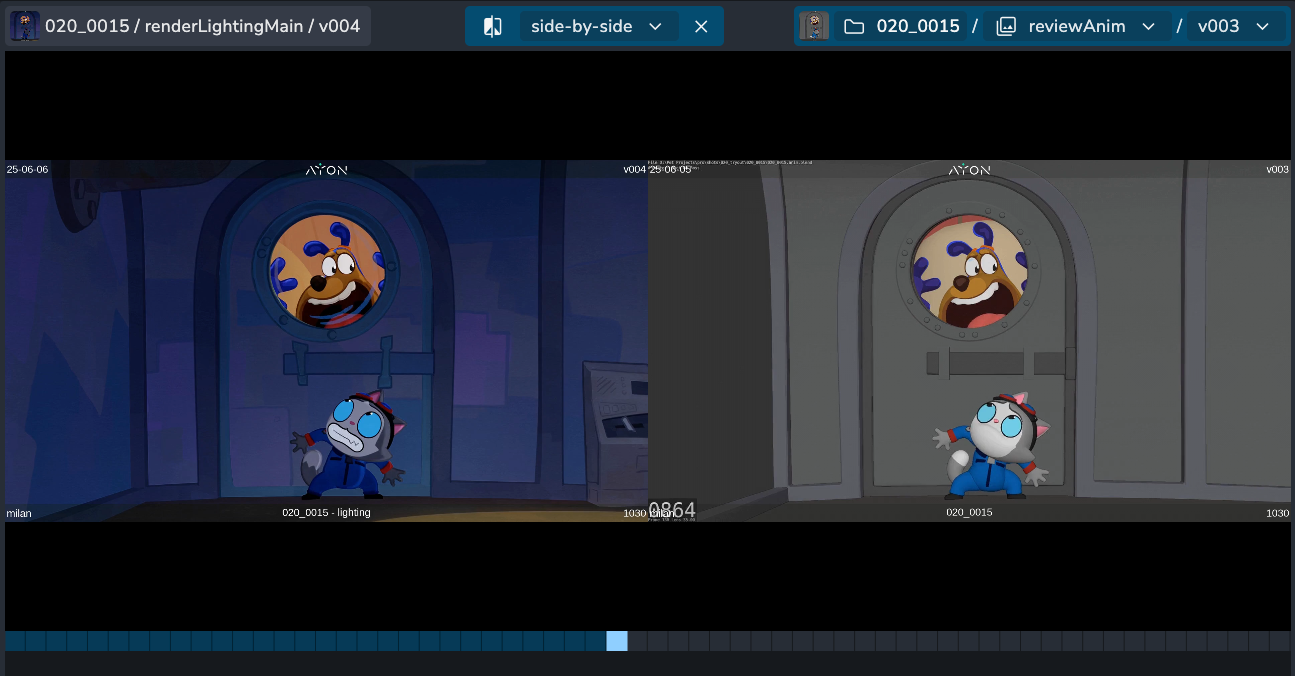
The comparison tool is no longer limited to previous versions of the same product. You can now compare your current clip against any version, product, or folder in the system.

  • Cross-Department Checks: Compare your lighting render directly against the layout or animation paths to ensure everything lines up.

  • Sequence Continuity: Load a completely different shot to check that lighting and color match perfectly between cuts.

🛠️ Quality of Life & Fixes

  • Playback Speed: You can now set and sync video playback speed (from 0.25x up to 2x) for all participants.

  • Actions Menu: Trigger external AYON Actions directly from within the review session.

  • Timeline Fixes: The timeline now scrolls with the playhead during playback and properly aligns when reviewing images or very short clips.

  • Refined Shortcuts: Pressing I or O now updates the point to your current frame instead of toggling it off. Use [ and ] for annotation brush sizes, and , or . to toggle your side panels.

Review is a premium addon included with the Studio subscription, or as an extra with a Pro subscription.

Earlier updates