
Changelog

Follow new updates and improvements to AYON.

Planner 2.3.0 - 🔐 Access Permissions
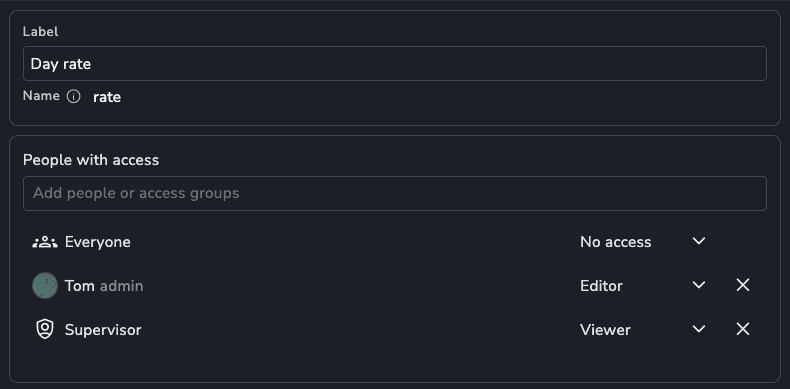
Control exactly who can see and edit what's in the Planner. Set access per project for events, and lock down individual attributes so sensitive information stays with the people who need it.

🗓️ Event Access

Decide who can view or edit events based on the project they belong to.

  • Project Events: Give users access to events through the access groups they have on that project. Someone can be an editor on one project and a viewer on another.

  • Studio Events: Set separate access for events without a project, like studio meetings or holidays.

  • Access Levels:

    • Editor: Create, move, update and delete events.

    • Viewer: See everything about the event, but can't change it.

    • No Access: The event is redacted. Users can see that something is booked, but not what it is.

For example:

  • A freelancer on your commercial project can manage their own bookings there, but only sees "busy" blocks for everything else.

  • Leads can edit events on their own show and view the rest of the schedule.

  • Everyone can see studio holidays and meetings, but only production can change them.

Required Project: If a user has less than Editor access to studio events, they must select a project when creating an event. This makes sure every event they create lands in a project they can actually work on.

🏷️ Attribute Access

Set who can see or edit each event and resource attribute. Give access to everyone, specific users or access groups.

For example:

  • Day Rate: Hidden from artists, visible to supervisors and editable only by producers.

  • Budgeted Hours: Visible to leads on the project, editable by production only.

  • Client Notes: Kept private to the supervisors on that project.

Planner is a premium addon included with the Studio subscription, or as an extra with a Pro subscription.
Addon

Planner 2.2.0 - 🔄 Recurring Events

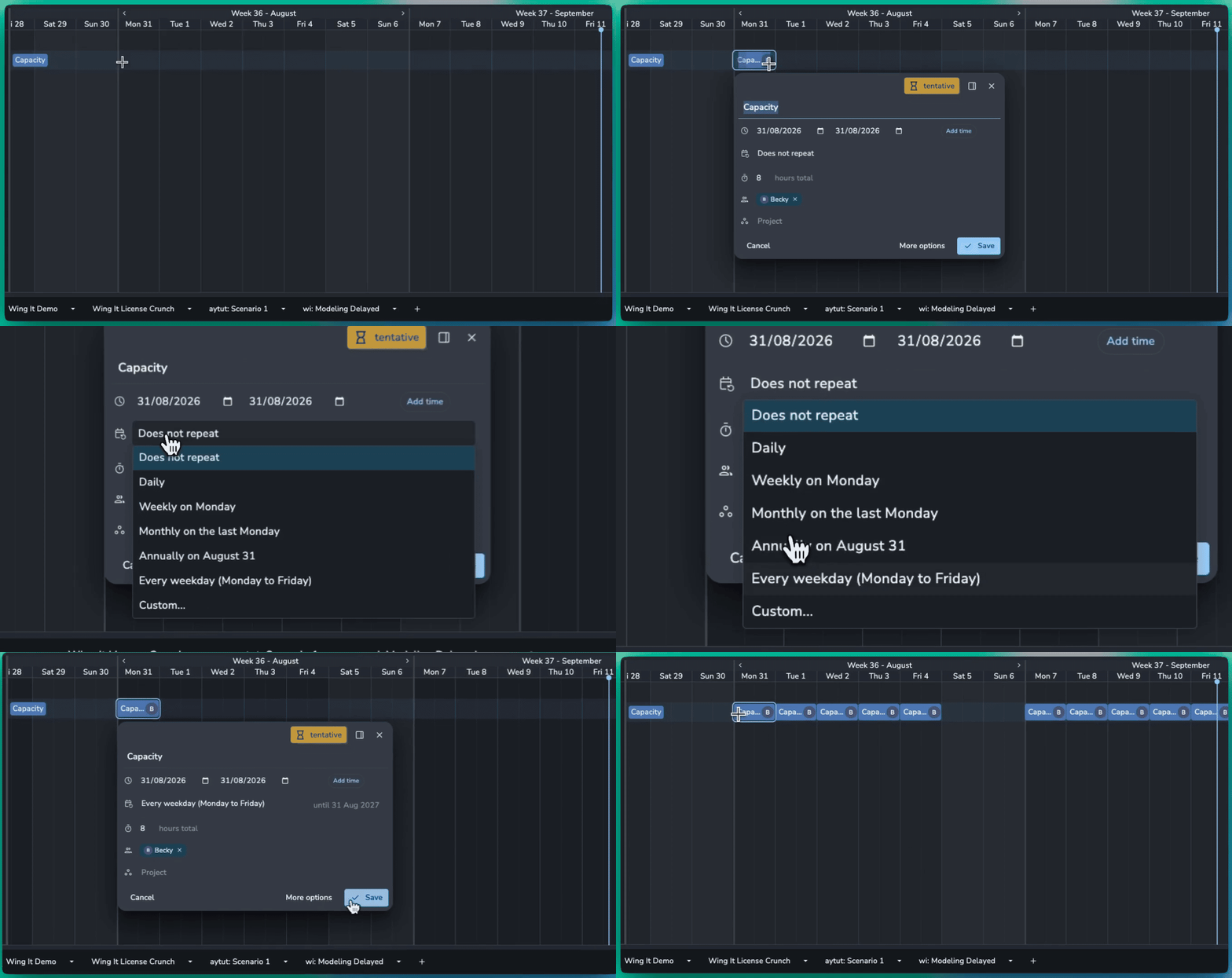
You can now create recurring events for regular bookings, meetings, working hours, and other repeated events.

🗓️ Flexible Recurrence

Create recurring events for things like:

  • Daily: Studio opening hours, morning production meetings, or daily reviews.

  • Weekly: Department meetings every Wednesday or a weekly production sync.

  • Weekdays: Book a resource from Monday to Friday for a defined period.

  • Selected days: Schedule a supervisor every Monday, Wednesday, and Friday.

  • Monthly: A production meeting on the last Friday of every month.

  • Nth weekday: A review session on the first Monday of each month.

  • Intervals: A meeting every other Wednesday.

✏️ Flexible Updates

Changes to recurring events can be applied to the current event, following events, or the entire series. You can also override an individual occurrence without changing the rest of the schedule.

Individual events or entire recurring series can be deleted when no longer needed.

Planner is a premium addon included with the Studio subscription, or as an extra with a Pro subscription.

Addon

Planner 2.0.2 - Contextually Pick Event Resources

When creating a new event within the context of a resource attribute, a resource picker filtered to the filters will open to picker from.

When grouping by or filtering a resource attribute like “Location: London” or “Department: Lighting”, creating new events will show you all resources that are London based you can quickly pick who you want on the event.

❤️ Improvements

  • Add created by/at and updated by/at details to the event

🛠️ Bugfixes

  • Fixed an issue where adding the time to an existing event wouldn’t work.

  • Scenarios: Hide scenario controls for users as they cannot update scenarios

  • Scenarios: Add a written confirmation for deleting scenarios to make it hard to delete one by accident.

  • Scenarios: Add confirmation for setting a scenario to live.

Addon

Earlier updates